 Generato
Photo or text to a 3D avatar
Upload a full-body photo of a person, or describe a character in a sentence, and Generato builds a photoreal 3D avatar, rigs it automatically and gives it 160+ animations, from a wave to a backflip. Stand it next to you in AR, watch it move in mixed reality on Meta Quest, or download it as a PLY Gaussian splat.
Create a 3D avatar — free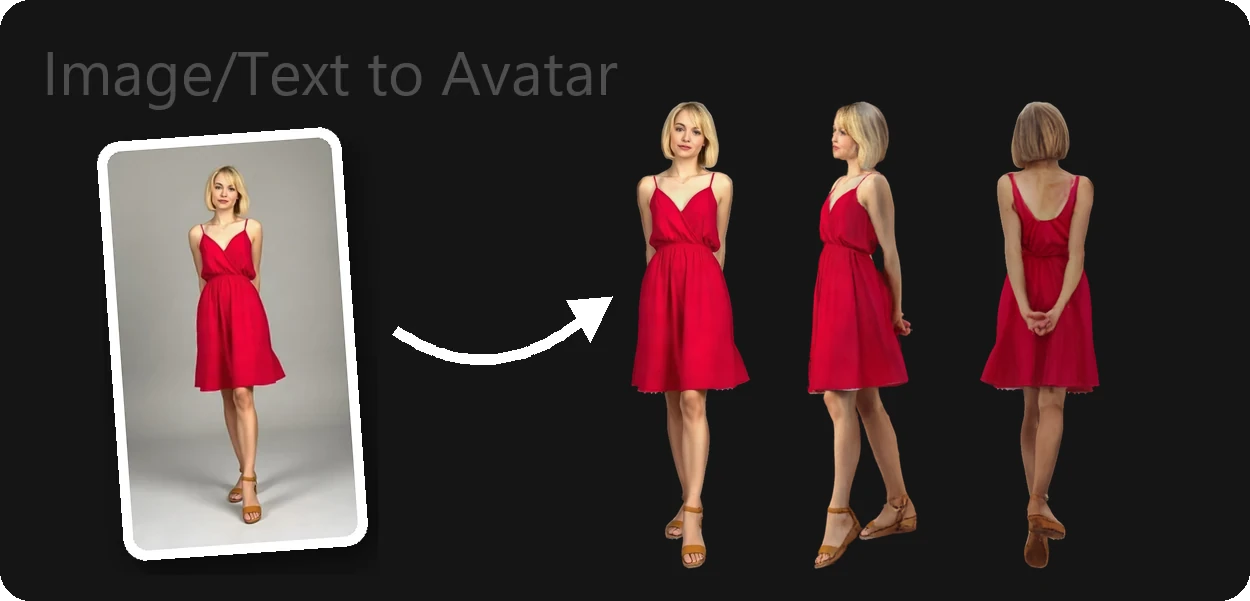
How a photo becomes a 3D avatar
- Start from a photo or a sentence. Upload a full-body picture of one person, or describe a character, for example "a woman in a red summer dress and sandals". For text, an AI image model first creates a full-body reference photo.
- The person is seen from all sides. A multi-view model built for clothed people imagines the front, sides and back, plus a close-up of the face, from that single picture.
- The views are fused into one 3D avatar. Generato trains a 3D Gaussian splat on those views, then cleans up the in-between angles so the avatar holds together as you walk around it.
- Rigged and ready to move. The avatar lands in your library in about 3–4 minutes with a 22-bone skeleton fitted to it. Pick any of 160+ animations and play it in the browser, over your phone camera or in mixed reality, or download the PLY file.
Photos and prompts that work best
- One person, head to toe. The whole body in frame, with nothing cut off at the feet or head.
- Standing, arms slightly away from the body. A relaxed A-pose gives the cleanest sides and back.
- A plain background and even light. Busy scenes and harsh shadows make the person harder to separate.
- For text, describe the outfit and look. Hair, clothing, colours and shoes help. Avoid wording about sex appeal: prompts are checked by automated safety filters and will be refused.
Only upload photos of yourself, or of people who have agreed to it. Using someone's likeness without consent, explicit content and sexualised images are not allowed — see the Terms & Conditions.
What you get
A photoreal 3D character
A Gaussian splat that keeps the look of the photo: skin, hair, fabric and colours, viewable from all sides.
Rigged, with 160+ animations
Dances, waves, jumping jacks, a backflip: the avatar plays them in the browser, in AR and on Meta Quest.
AR and Meta Quest
Stand the avatar in your room on Meta Quest or over your phone camera.
A PLY download
Open it in SuperSplat or load it in a Three.js or WebXR scene.
Examples to try first
Every library includes sample avatars, so you can see the quality before spending credits.
Good to know
- Animation plays inside Generato. Avatars are rigged automatically and play the 160+ animations in the browser, in AR and on Meta Quest. The PLY download is the splat in a neutral pose, not a polygon mesh with a skeleton, so it isn't suited to game engines that need skinned meshes or to 3D printing.
- The hidden sides are generated. The back and sides are the model's best guess from one photo. They usually look natural but will not match the real person exactly.
- Each run is a new variation. If a detail comes out wrong, use Regenerate on the avatar's card to try again from the same photo.
Frequently asked questions
How much does a 3D avatar cost?
Each avatar uses 5 credits, and Regenerate uses another 5. New accounts start with 5 free credits — enough for one avatar — and extra credits are one-time packs that never expire.
How long does it take?
About 3–4 minutes. The library card shows the progress while it works, and you can keep using the app in the meantime.
Can I make an avatar from a text description?
Yes. Switch to "From Text" and describe the character. Generato first creates a full-body photo with an AI image model, then turns it into a 3D avatar.
Is the avatar rigged or animated?
Yes. Avatars are rigged automatically with a 22-bone skeleton and can play any of 160+ animations (dances, waves, jumping jacks, even a backflip) in the browser, in phone AR and on Meta Quest. Animation plays inside Generato; the PLY download is a static Gaussian splat.
What file format do I get?
A PLY Gaussian splat. It opens in splat tools such as SuperSplat, in PlayCanvas and Three.js, and in Unity or Unreal with a Gaussian splatting plugin.
Can I make an avatar of a real person?
Only of yourself, or of someone who has agreed to it. Impersonating or deepfaking real people is not allowed, and uploads are checked by automated moderation.
Why was my prompt or photo blocked?
Prompts and images pass automated safety checks. Explicit content, sexualised wording and images of minors are refused. Describe the outfit and style instead, and try again.
What happens if a generation fails?
Your 5 credits are refunded automatically, and the app tells you so. Clearer full-body photos on plain backgrounds fail far less often.
More from Generato
Create a 3D avatar
Start with free credits. No subscription, no install — it runs in your browser and on Meta Quest.
Open Generato