 Generato
Convert a photo to a Gaussian splat (PLY)
You do not need to walk around an object with your camera. Give Generato one photo — from your phone, a web image search or an image link — and it returns a 3D Gaussian splat of the main subject as a PLY file you can open in any splat viewer.
Turn a photo into a splat — free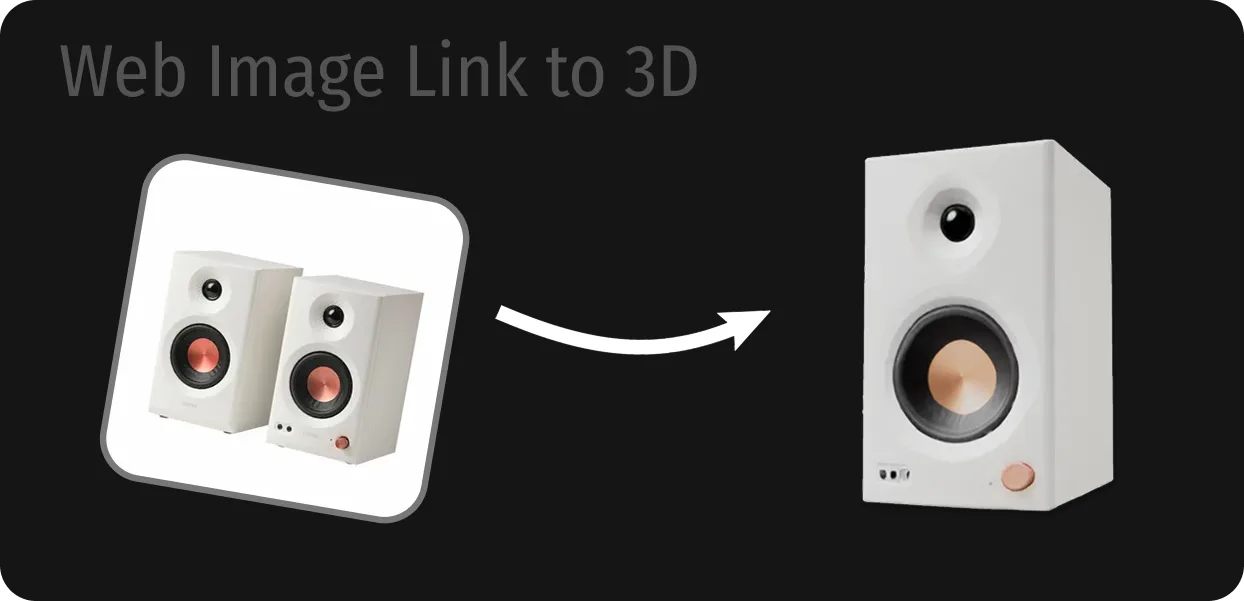
From one photo to a PLY file
- Pick your photo. Upload an image file, search the web from inside Generato, or paste the link to an image.
- Automated checks run. Every image passes content moderation before it is processed.
- TripoSplat rebuilds it in 3D. The model isolates the main subject, estimates its shape and fills in the sides the photo does not show.
- Download the PLY. The splat appears in your library. Press the download icon on its card to save the .ply file.
One photo vs a full capture
A single photo cannot show the back of an object, so the back of your splat is the model's best guess — usually believable, but not an exact copy. If you need an accurate digital twin of a real object, capture it from every side with a photogrammetry or splat-capture app. If you want a quick 3D version of a product shot, a concept image or something you saw online, one photo is all Generato needs.
Photos that make good splats
- A three-quarter view that shows the front, one side and a little of the top gives the model the most to work with.
- Sharp and well lit. Blur, deep shadows and heavy compression all show up in the splat.
- Matte beats mirror. Glass, chrome and other reflective or transparent surfaces are the hardest to reconstruct.
- Nothing in the way. Avoid hands holding the object, other objects overlapping it, or edges cut off by the frame.
More general tips are on the image to 3D page.
Open the PLY anywhere
Splat editors
Open the file in SuperSplat or a similar editor to crop, clean up or compress it.
Your own web app
Load it with a Three.js, PlayCanvas or Babylon.js splat renderer — see how.
AR and mixed reality
Skip the export and view it over your phone camera or on Meta Quest.
Frequently asked questions
Can I make a Gaussian splat from just one photo?
Yes. Generato uses the TripoSplat model, which generates a complete 3D Gaussian splat from a single image. You do not need a video or a multi-photo capture.
What kind of image can I upload?
Common image files from your phone or computer, such as JPG, PNG and WebP. You can also use the built-in web image search or paste an image URL.
How accurate is the back of the object?
The hidden sides are generated, not measured. They usually look natural, but they will not match the real object exactly. For a faithful replica, use a capture app that photographs every side.
How do I download the PLY file?
Open your library, find the model and press the download icon on its card. The file is saved as a .ply Gaussian splat.
Are any photos blocked?
Yes. Uploads are checked by automated moderation, and explicit content, images of real people used for deepfakes and other prohibited material are blocked. See the Terms & Conditions.
Does it cost anything?
Each conversion uses one credit. New accounts start with 5 free credits, and extra credits are one-time purchases that never expire.
More from Generato
Turn a photo into a splat
Start with free credits. No subscription, no install — it runs in your browser and on Meta Quest.
Open Generato